Challenge Name:
Nissrensics: Vandrestien
Category:
Forensics
Challenge Description:
Er du god til digitale undersøgelser, eller synes du bare, det bliver noget nissrensics? Har du styr på alle Windows nissefakterne, eller giver du op efter `strings`?

Start din rejse med en god lang gåtur gennem mit filsystem.
The handout for this challenge was a 20 GB EnCase disk image, which is not attached here for obvious reasons.
The challenge clearly hints at digital forensics (“nissrensics”) on a Windows system, with an emphasis on filesystem artifacts rather than quick wins using tools like strings.
Approach
For disk image and filesystem forensics challenges, I personally prefer Autopsy due to its excellent GUI, timeline view, and artifact parsing.
For multi-stage challenges like this one, I always start by manually browsing the filesystem to get a feel for the machine:
- Who is the user?
- What kind of system is it?
- Are there obvious breadcrumbs left behind?
In this case, the image appears to come from a Windows machine belonging to a user named Nisseya.
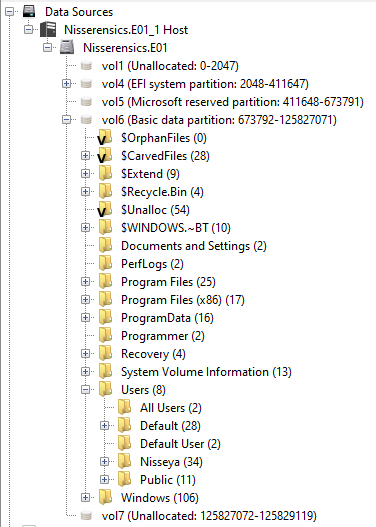
Initial enumeration
A good rule of thumb in Windows forensics is to start with user-controlled locations, especially:
- Desktop
- Documents
- Downloads
- Pictures
- AppData (often very important later)
Other things of note:
- The disk have both Edge, Firefox and Chrome installed.
- The timeline shows that the order went:
- Edge - checked their IP (myip.com), downloaded Firefox and installed it.
- Firefox - browsed around quite a bit more:
- Loads of christmas related Google searches
- Russian Youtube music videos
- Browsed BR.dk (Danish toy store)
- Created a CTF user at Nc3ctf.dk
- Downloaded Chrome
- Chrome:
- More Christmas related google searches
- More interactions with nc3ctf.dk
This will probably be relevant in later tasks ;)
While browsing the Desktop, one folder immediately stood out: Bedstemors fødseldags billeder (Grandmother’s birthday pictures).
This looked like a deliberate breadcrumb rather than a coincidence, so I followed it.
Following the trail
The folder contained another folder. That folder contained another folder. And so on.
After descending roughly 10 directory levels deep, I eventually reached a file named:
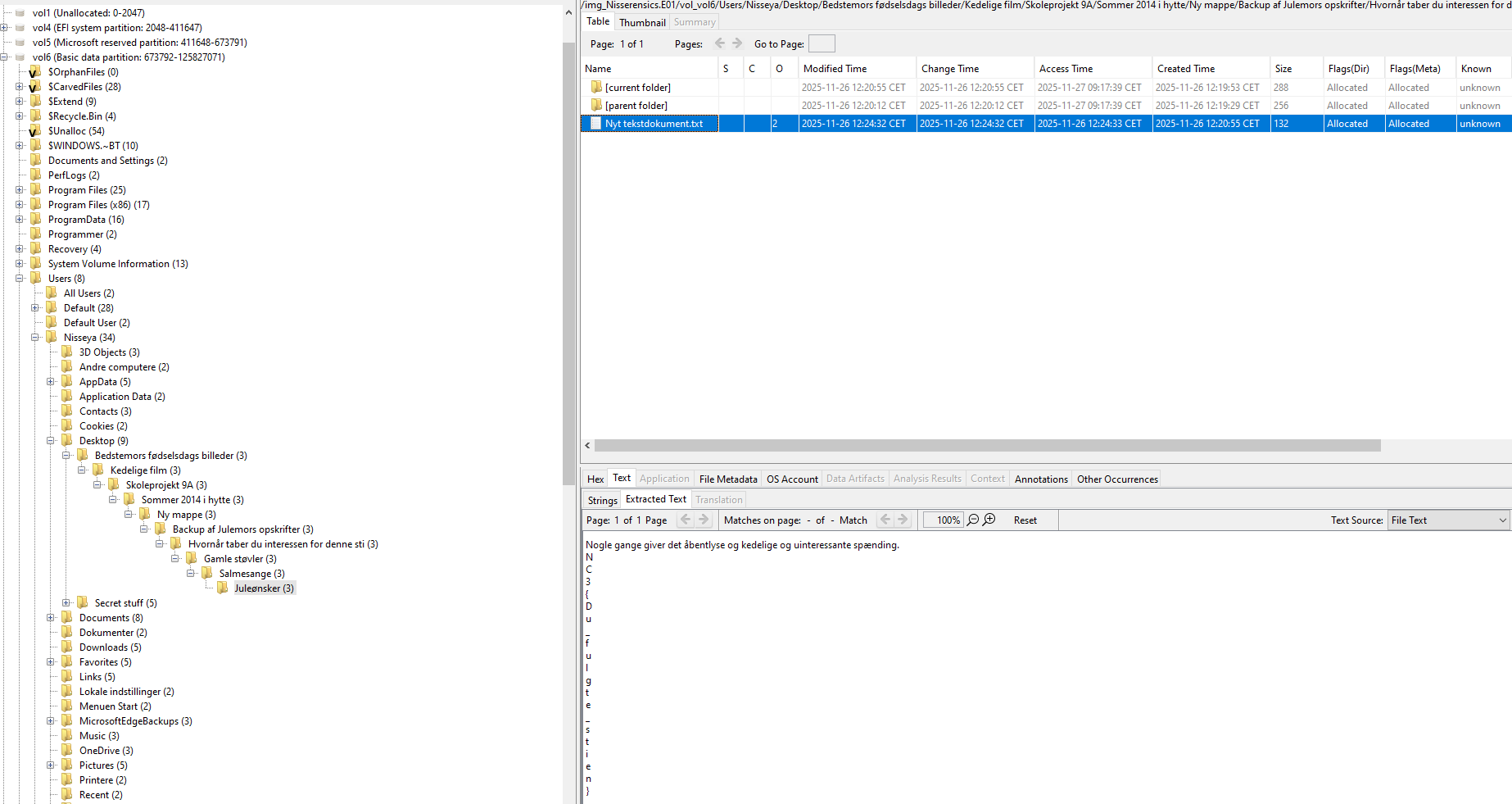
Inside this file was the first flag. Notably, the flag was split and formatted in a way that makes it difficult to find via simple keyword searches, reinforcing the challenge’s hint that this was about walking the filesystem, not shortcutting it.
Next part of the series is
Flag
NC3{Du_fulgte_stien}
Reflections and Learnings
This challenge serves as a classic introductory filesystem forensics task, and it does a few things very well:
- Encourages manual exploration: Rather than relying on automated searches or artifact extraction, the challenge rewards curiosity and patience.
- Reinforces where to look first on Windows systems: User folders, especially the Desktop, are often overlooked in favor of more “technical” artifacts.
- Punishes lazy approaches The flag placement and formatting intentionally defeat strings, bulk searches, and naive grepping.
Overall, this was a solid warm-up challenge that reinforces a fundamental lesson in forensics CTFs:
Sometimes the intended solution really is just to look around carefully.