Challenge Name:
Nissrensics: Mørkets Dal
Category:
Forensics
Challenge Description:
Det er så mørkt hernede, jeg kan ikke engang se min egen skygge. Men jeg er sikker på, det var her, jeg gemte det tidligere.

OBS: Samme image som i "Nissrensics: Vandrestien"
Approach
Since the flag was clearly not present in plaintext anymore, the task became one of data recovery rather than discovery.
Based on prior enumeration of Nisseya’s disk, one file stood out immediately.
In the user’s Documents folder, I had previously encountered the following file:
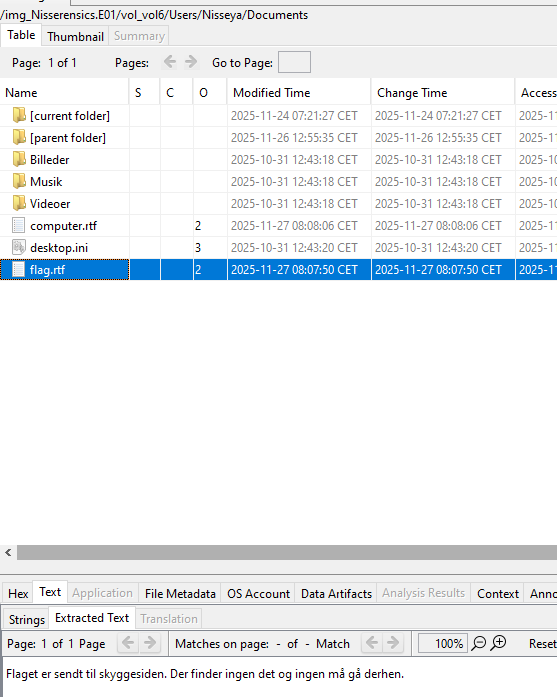
Contents of flag.rtf:
Flaget er sendt til skyggesiden. Der finder ingen det og ingen må gå derhen.
Translation:
The flag has been sent to the shadow side. Nobody finds it there and nobody must go there.
This message aligns perfectly with the challenge description and strongly suggests that:
- The file previously contained something else
- The original contents were removed or overwritten
Possible Recovery Techniques
There are several ways Windows systems may retain old data even after modification:
- NTFS transaction logs ($LogFile)
- Volume Shadow Copies (VSS)
- Unallocated space / deleted file recovery
- Recycle Bin artifacts
- Previous Versions metadata
Given the explicit reference to shadows, $LogFile and VSS were prime candidates.
NTFS $LogFile
What is $LogFile?
$LogFile is an NTFS transaction journal that records metadata and, in some cases, file content changes to ensure filesystem consistency. When files are created, modified, or deleted, NTFS logs these operations before committing them.
In a CTF context, this is extremely valuable because:
- Old file contents may still exist
- Overwritten resident files can sometimes be fully recovered
- Changes are timestamped and associated with MFT records
Parsing $LogFile
I extracted $LogFile from the disk image using Autopsy and parsed it using the excellent tool LogFileParser

$LogFile processing finished in 11 min 9 sec.
Importing csv's to db and updating tables.
Csv import and table updates took 5 sec.
Reconstruction of dataruns finished in 2 hr 31 min 40 sec
Done!
The long processing time was actually a good sign, it indicated a large and rich transaction history.
Identifying the File in $LogFile
From the parsers output, I used LogFile_FileNames.csv to locate flag.rtf:
Offset|lf_LSN|MftRef|MftRefSeqNo|FileName
...
0x02417F88|2772971513|159084|6|flag.rtf
MFT Reference 159084 uniquely identifies the file in the NTFS Master File Table.
This allows us to correlate all logged operations related to that file
Recovering Old File Contents
The most interesting data lives in LogFile_Mft_Data.txt, which contains logged file content changes.
Searching for MFT record 159084, I found multiple $DATA operations. One of them revealed the original contents of flag.rtf:
LSN: 2772971399
Record: 159084
ReDo: 0
Operation: CreateAttribute
$DATA:
0000	7b 5c 72 74 66 31 5c 61  6e 73 69 5c 61 6e 73 69   {\rtf1\ansi\ansi
0010	63 70 67 31 32 35 32 5c  64 65 66 66 30 5c 6e 6f   cpg1252\deff0\no
0020	75 69 63 6f 6d 70 61 74  5c 64 65 66 6c 61 6e 67   uicompat\deflang
0030	31 30 33 30 7b 5c 66 6f  6e 74 74 62 6c 7b 5c 66   1030{\fonttbl{\f
0040	30 5c 66 6e 69 6c 5c 66  63 68 61 72 73 65 74 30   0\fnil\fcharset0
0050	20 43 61 6c 69 62 72 69  3b 7d 7d 0d 0a 7b 5c 2a    Calibri;}}..{\*
0060	5c 67 65 6e 65 72 61 74  6f 72 20 52 69 63 68 65   \generator Riche
0070	64 32 30 20 31 30 2e 30  2e 31 38 33 36 32 7d 5c   d20 10.0.18362}\
0080	76 69 65 77 6b 69 6e 64  34 5c 75 63 31 20 0d 0a   viewkind4\uc1 ..
0090	5c 70 61 72 64 5c 73 61  32 30 30 5c 73 6c 32 37   \pard\sa200\sl27
00a0	36 5c 73 6c 6d 75 6c 74  31 5c 66 30 5c 66 73 32   6\slmult1\f0\fs2
00b0	32 5c 6c 61 6e 67 36 20  4e 43 33 5c 7b 73 6b 79   2\lang6 NC3\{sky
00c0	67 67 65 72 5f 61 66 5f  74 69 64 6c 69 67 65 72   gger_af_tidliger
00d0	65 5f 64 61 74 61 5c 7d  5c 70 61 72 0d 0a 7d 0d   e_data\}\par..}.
00e0	0a 00                                              ..

LSN: 2772971678
Record: 159084
ReDo: 1
Operation: UpdateResidentValue
$DATA:

LSN: 2772972140
Record: 159084
ReDo: 0
Operation: CreateAttribute
$DATA:
0000	7b 5c 72 74 66 31 5c 61  6e 73 69 5c 61 6e 73 69   {\rtf1\ansi\ansi
0010	63 70 67 31 32 35 32 5c  64 65 66 66 30 5c 6e 6f   cpg1252\deff0\no
0020	75 69 63 6f 6d 70 61 74  5c 64 65 66 6c 61 6e 67   uicompat\deflang
0030	31 30 33 30 7b 5c 66 6f  6e 74 74 62 6c 7b 5c 66   1030{\fonttbl{\f
0040	30 5c 66 6e 69 6c 5c 66  63 68 61 72 73 65 74 30   0\fnil\fcharset0
0050	20 43 61 6c 69 62 72 69  3b 7d 7d 0d 0a 7b 5c 2a    Calibri;}}..{\*
0060	5c 67 65 6e 65 72 61 74  6f 72 20 52 69 63 68 65   \generator Riche
0070	64 32 30 20 31 30 2e 30  2e 31 38 33 36 32 7d 5c   d20 10.0.18362}\
0080	76 69 65 77 6b 69 6e 64  34 5c 75 63 31 20 0d 0a   viewkind4\uc1 ..
0090	5c 70 61 72 64 5c 73 61  32 30 30 5c 73 6c 32 37   \pard\sa200\sl27
00a0	36 5c 73 6c 6d 75 6c 74  31 5c 66 30 5c 66 73 32   6\slmult1\f0\fs2
00b0	32 5c 6c 61 6e 67 36 20  46 6c 61 67 65 74 20 65   2\lang6 Flaget e
00c0	72 20 73 65 6e 64 74 20  74 69 6c 20 73 6b 79 67   r sendt til skyg
00d0	67 65 73 69 64 65 6e 2e  20 44 65 72 20 66 69 6e   gesiden. Der fin
00e0	64 65 72 20 69 6e 67 65  6e 20 64 65 74 20 6f 67   der ingen det og
00f0	20 69 6e 67 65 6e 20 6d  5c 27 65 35 20 67 5c 27    ingen m\'e5 g\'
0100	65 35 20 64 65 72 68 65  6e 2e 5c 70 61 72 0d 0a   e5 derhen.\par..
0110	7d 0d 0a 00                                        }...
The record shows the content of flag.rtf before and after the change, including our flag!
Additional information for the next task
Just below the flag.rtf entries in $LogFile, I noticed another modified file: computer.rtf, located in the same directory as flag.rtf.
Current contents in the disk image:
konto: Nisseya
Adgang: REDACTED ;D
The record shows:
LSN: 2772977943
Record: 166428
ReDo: 0
Operation: CreateAttribute
$DATA:
0000	7b 5c 72 74 66 31 5c 61  6e 73 69 5c 61 6e 73 69   {\rtf1\ansi\ansi
0010	63 70 67 31 32 35 32 5c  64 65 66 66 30 5c 6e 6f   cpg1252\deff0\no
0020	75 69 63 6f 6d 70 61 74  5c 64 65 66 6c 61 6e 67   uicompat\deflang
0030	31 30 33 30 7b 5c 66 6f  6e 74 74 62 6c 7b 5c 66   1030{\fonttbl{\f
0040	30 5c 66 6e 69 6c 5c 66  63 68 61 72 73 65 74 30   0\fnil\fcharset0
0050	20 43 61 6c 69 62 72 69  3b 7d 7d 0d 0a 7b 5c 2a    Calibri;}}..{\*
0060	5c 67 65 6e 65 72 61 74  6f 72 20 52 69 63 68 65   \generator Riche
0070	64 32 30 20 31 30 2e 30  2e 31 38 33 36 32 7d 5c   d20 10.0.18362}\
0080	76 69 65 77 6b 69 6e 64  34 5c 75 63 31 20 0d 0a   viewkind4\uc1 ..
0090	5c 70 61 72 64 5c 73 61  32 30 30 5c 73 6c 32 37   \pard\sa200\sl27
00a0	36 5c 73 6c 6d 75 6c 74  31 5c 66 30 5c 66 73 32   6\slmult1\f0\fs2
00b0	32 5c 6c 61 6e 67 36 20  6b 6f 6e 74 6f 3a 20 4e   2\lang6 konto: N
00c0	69 73 73 65 79 61 5c 70  61 72 0d 0a 41 64 67 61   isseya\par..Adga
00d0	6e 67 3a 20 4e 69 63 68  6b 69 79 61 5c 70 61 72   ng: Nichkiya\par
00e0	0d 0a 7d 0d 0a 00                                  ..}...
This strongly suggests that Nichkiya is a password for the Nisseya user, possibly even Windows password.
Information that is likely relevant in later challenges.
Alternative way of obtaining the flag
After completing the challenge and discussing it with the creator, I learned there was a second, more straightforward solution.
Windows Shadow Copies (VSS)
Windows periodically creates Volume Shadow Copies, which store historical versions of files. These can often be explored even without administrator access on the original system.
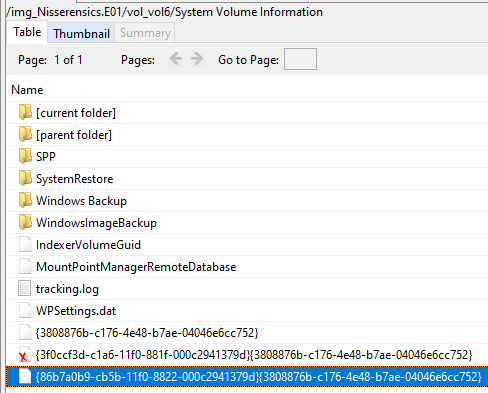
From Autopsy, we know there’s a Windows shadow volume copy in the System Volume Information folder, recognized by the filename {Shadow copy UUID}{3808876b-c176-4e48-b7ae-04046e6cc752}:
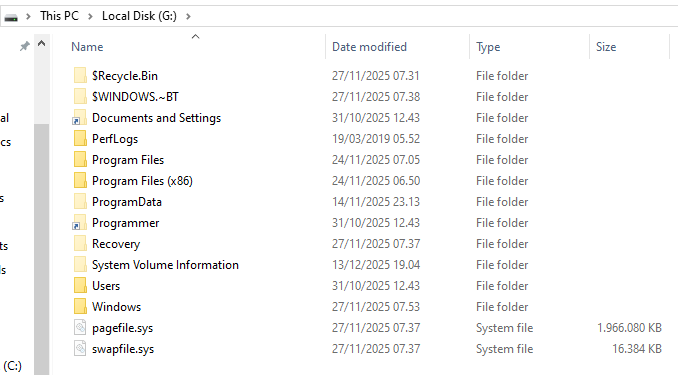
By mounting the disk image as a drive, these shadow copies become accessible.
I used Arsenal Image mounter, though FTK imager works just as well.
The result is a new drive on my computer, with the image’ content ready for exploration:
Exploring the Shadow Copy
Using ShadowExplorer on the mounted image, I navigated the shadow copy:
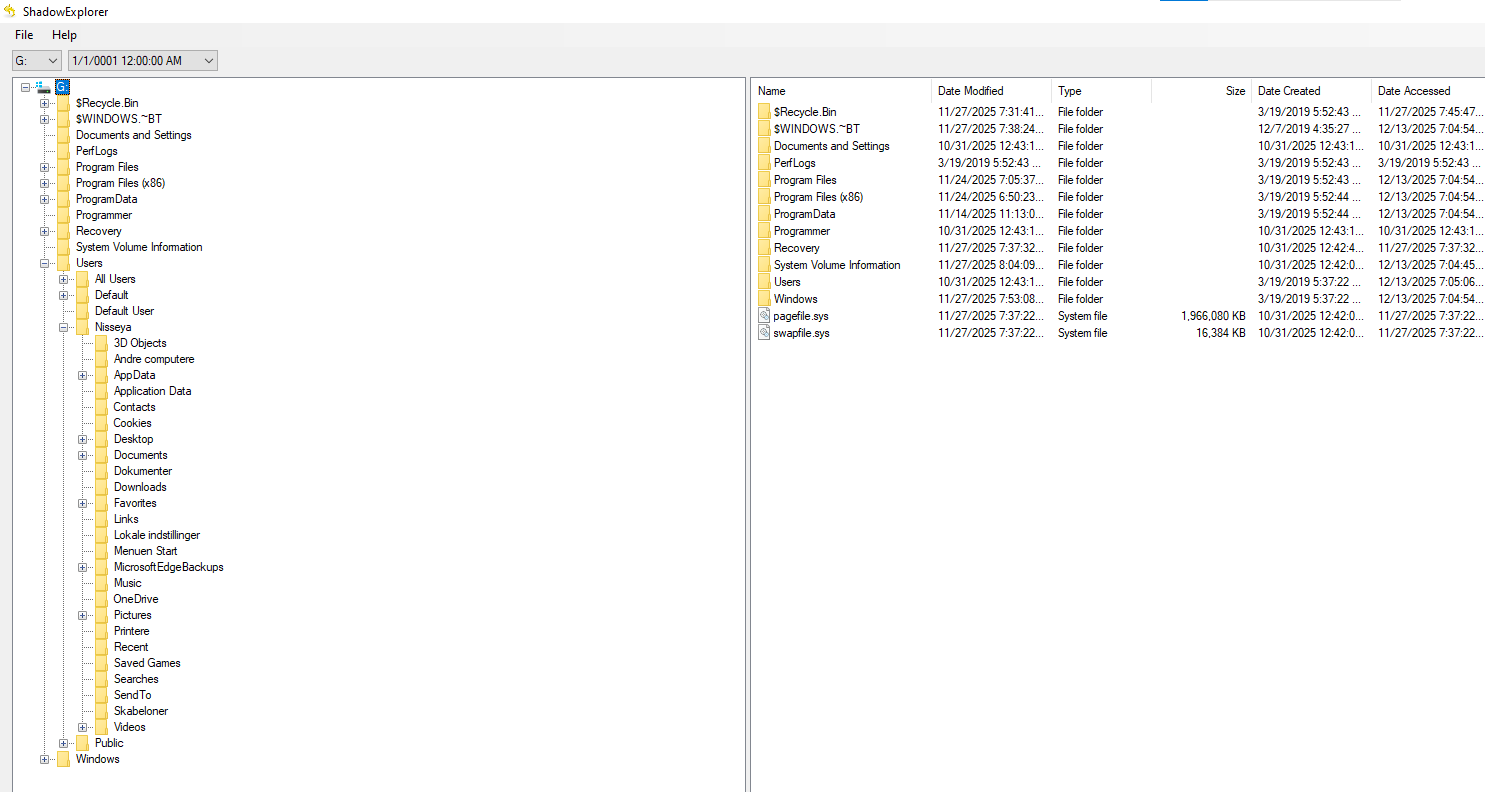
Browsing to the user’s Documents folder revealed earlier versions of the .rtf files:

Opening the historical flag.rtf and computer.rtf showed the same flag and login recovered earlier via $LogFile:

Challenge series continues in Forkromet Mellemgasfordeler
Flag
NC3{skygger_af_tidligere_data}
Reflections and Learnings
This challenge beautifully demonstrates how data is rarely truly gone on modern filesystems:
- NTFS is verbose by design: $LogFile can leak historical content even after overwrites.
- Shadow copies are goldmines: They often provide a cleaner and faster recovery path than low-level parsing.
- Multiple valid solutions: The challenge rewards both deep filesystem knowledge and practical tooling skills.
- Strong challenge chaining: Recovering the Windows password clearly sets up future tasks.
Overall, Mørkets dal is an excellent example of a forensics challenge that rewards methodical thinking, tool familiarity, and attention to narrative clues, exactly what good forensic CTFs should do.